Results for Port scanning

winAUTOPWN V2.7 | Windows Interactive exploit framework Tool

Wednesday, September 21, 2011
winAUTOPWN is a simple tool which works on windows platform and is quick in systems vulnerability exploitation.This is tool which takes less information from your side and does more effective work.
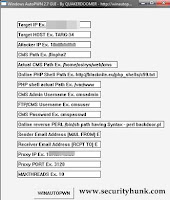
winAUTOPWN V2.7


Why you should use this tool?

1. It takes simple inputs like IpAddress,Hostname,CMS Path

2. It also does a smart multi-threaded port scan (1 to 65535).

3. Exploits written by other writers can be added to it to evoke a remote shell from target box.

4.It helps the attacker to check the no of exploits it has used on the target box.

In the new version this tool has added few extra features like
  • Commandline parameters for Reverse Shell URL 
  • Mail-to,mail-from(Email server exploit)
Download
winAUTOPWN V2.7 | Windows Interactive exploit framework Tool winAUTOPWN V2.7  | Windows Interactive exploit  framework Tool Reviewed by Satyajit (Admins,a.k.a Satosys) on Wednesday, September 21, 2011 Rating: 5

Few Online Tools for Computer and Online Security

Thursday, January 06, 2011
Computer security is of foremost importance these days even more than our physical security..lol.There are few online tools available through which we ensure our security to certain extent.We cannot say our PC will be 100% secure but to some extent we will be benefited  for sure.
File scanner:

1.Kaspersky:
It can used to scan files upto size 1mb and archieve file(zip,arj format etc) upto 1mb.The database is updated every 3 hours to ensure that newest virus are detected.
Kaspersky

2.Avast:
Here you can scan a single file each time and that should not be more than 16mb.
Avast

3.VirusTotal:
Here you can scan a file upto 20mb.You can send file by SSL and via email also.
VirusTotal

4.NovirusThanks:
Here you can scan file upto 20mb,where the file will be scanned by 24 antivirus engine and is one of the best online scanning tool.
Novirusthanks

System scanner:

1.Bitdefender:
It can scan your PC ,system memory,boot sector.It can be used without uninstalling the existing security product.
bitdefender

2.Symantec(Norton):
It can be used to scan the system.It is the one of the old Anti-virus company and easy to use.
Symantec

3.Eset:
Administrative previleges is required to use this online scanner.It is user friendly and operates from the browser.
eset

4.PandaSecurity:
You need the activex control to use this online tool.It is a good product from panda.
Pandasecurity
Browser scanner:

1.Qualys:
You need to install the required plugin to use this tool.It checks for vulnerability and issues in the browser.
Qualys

2.BrowserScope:
It scans for browser functionality and issues.
BROWSERSCOPE

3.Scanit:
It will scan the browser for issues and vulnerabilites.You need to close all other tabs before using it and enable persistent cookies.
Scanit

4.Panopticlick:
It test your browser and give scores for uniqueness and trackable functionality.
Panopticlick
Url scanner:

1.UrlVoid:
It scans the url with multiple antivirus engine.It is simple to use.
UrlVoid

2.Avg:
Just copy and drop the suspicious url and press enter.
AVG

3.VirusTotal:
It is a simple tool to use as the file scanner of it.
Virustotal_url

4.OnlineLinkscan:
It scan the link from potential threats with a simple click.
Onlinelinkscan
Port scanner:

1.T1shopper:
It scans the Ipaddress for open ports.There is a list of some essential ports on the webpage.
t1shopper

2.Nmap:
It is one of the best port scanning tool and easy to use.
Nmap

3.SubnetOnline:
It scans an Ipaddress for open and closed TCP ports.
Subnetonline

4.AuditmyPc:
Here you can scan for ports to test the strength of your firewall.
AUDITMYPC

5.Hashmian:
It provide a range of ports to scan and list of some essential ports.
Hashemian

If you find this post useful and interesting then do drop your comment.,it will be appreciated.. :)
Few Online Tools for Computer and Online Security Few Online Tools  for Computer  and Online Security Reviewed by Satyajit (Admins,a.k.a Satosys) on Thursday, January 06, 2011 Rating: 5

How to boot Backtrack from USB?

Friday, December 31, 2010
I am sure that many of you must have heard of Backtrack and its functionality.So I will not go in detail into what is back track but here I will tell you how you can use it from your USB.
What is Backtrack?
It is a Linux distribution and unix like OS made for pentesting and forensic analysis.It contains all the tools that an elite or a noob security and hacking enthusiast may dream of.

You can burn the .iso file of it to a DVD and boot.But here we will see how we can boot it from an USB.

Requirements:

1.Backtrack .iso file(Download)

2.Unetbootin.(Download)

3.HP Usb Disk Storage Format Tool.(Download)

4.USB (at least 2GB)

Procedure:

Step 1.
First format the USB with the "HP Usb Disk Storage Format Tool" not with the default one.

Step 2.
Now open Unetbootin and select Backtrack from the select distribution from the drop down menu and then select the version as shown in the image below.
Step 3.
Now select the disk image and follow as shown in the image below.Do check if the correct drive is being selected.
Step 4.
Now wait until all the files are being extracted and finish.
Step 5.
Now plugin the USB and reboot your box and press F12 or go to the boot menu and boot from the usb(primary) then follow the onscreen instructions.

If you find this post useful then do drop a comment it will be appreciated.... :)
How to boot Backtrack from USB? How to boot Backtrack from USB? Reviewed by Satyajit (Admins,a.k.a Satosys) on Friday, December 31, 2010 Rating: 5

Comments on blogs and its Security Threats

Wednesday, December 29, 2010
Well!!! comments are indeed a very vital and encouraging factor for each and every blogger.We also comment on blogs/sites of our niche and it is also recommended to comment on atleast 10-12 blogs/sites each day.But while commenting we tend to forget the security threats we may encounter while commenting on a site or blog.A simple comment that you drop on a blog/site can endup in compromising your box.So,in this post I will try to bring out the security threats you may encounter while commenting on a blog/site.
Nowadays almost all web pages have their own Ipaddress tracking mechanism or any third party tracking mechanism installed by which they can track the visitors.

Suppose that you comment on a blog/site with your naked Ipaddress(without hiding or masking) then it get logged with the administrator along with the OS you are using and the browser version and many more.These facts when exposed to someone can certainly be very risky and dangerous.The attacker may use the following steps to get into your box

1.FootPrinting: Gaining necessary information about the box

2.Port Scanning: Scanning for the open ports.

3.Banner Grabbing: Get the version about a desired service running on the box.

4.Vulnerability search: Search an exploit for the a particular version of a desired service.

5.Use exploit to penetrate: Use the exploit to get in the box and own it.

Suppose you are commenting on a Wordpress blog see what information the admin logs about you,as shown in the screenshot below.
(WordPress Account screenshot)

In the above screenshot you can see the admin gets your browser details along with your Ipaddress.

Similar if you are commenting on a Blogger blog with a third party tracking tool installed then see the below screenshot below.
(Blogger third party tracking Tool)

Suppose the admin have your Ipaddress he/she can follow the above mentioned steps,below I have shown only the portscanning with Nmap and see how it reveals the opened ports on the target.
(Nmap Screenshot:Port Scanning)

Countermeasures:
 So I recommend while commenting on any webpage do use a VPN or Proxy(Socks is good) to mask your real Ipaddress.
Comments on blogs and its Security Threats Comments on blogs and its Security Threats Reviewed by Satyajit (Admins,a.k.a Satosys) on Wednesday, December 29, 2010 Rating: 5

Hacking and Security Tools for Beginners and Elite - Complete Tool Kit

Saturday, September 25, 2010
Here is this post I have listed out few of the frequently and widely used Tools used by Hackers of all levels.But one thing i would like to mention is that "Hackers make tool but tool do not make Hackers"If you depend more on tools then you cannot evolve as a hacker rather you will be surrounded by tools and dependent on them.

1.Password Cracking Tools:

a) John the ripper-http://www.openwall.com/john/

b) THC hydra-http://www.thc.org/thc-hydra/

c) Brutus-http://www.hoobie.net/brutus/

d) L0PhtCrack-http://www.l0phtcrack.com/

e) SAMInside-http://insidepro.com

f) Cain and abel-http://www.oxid.it/cain.html

g) Pwdump-http://www.foofus.net/fizzgig/pwdump/

2.Pentesting Tools:

a) Metasploit framework- http://www.metasploit.com/

b) Canvas- http://www.immunitysec.com/products-canvas.shtml

3.Sql injector Tools:

a) Sqlihelper

b) Havij

c) SQL Exploiter

4.Website Vulnerability Scanner:

a) Acunetix- http://www.acunetix.com/

b) Rational appscan- http://www.ibm.com/software/awdtools/appscan/

5.Vulnerability Scanner:

a) Nessus-http://www.nessus.org/

b) Retina-http://www.eeye.com/html/Products/Retina/index.html

c) Sara-http://www-arc.com/sara/

6.Port Scanner:

a) Nmap- http://nmap.org/

b) Angry Ip scanner- http://www.angryziber.com/ipscan/

c) Super Scan- http://www.foundstone.com/us/resources/proddesc/superscan.htm

7.Intrusion detection Tools:

a) Snort-http://www.snort.org/

b) Sguil-http://sguil.sourceforge.net/

8.Live CDs:

a) Ophcrack- http://ophcrack.sourceforge.net/

b) Backtrack- http://www.backtrack-linux.org/

c) Hiren’s boot cd- http://www.hiren.info/pages/bootcd

d) Ultimate boot cd- http://www.ultimatebootcd.com/


9.Wireless Tools:

a) Wireshark- http://www.wireshark.org/

b) Kismet-http://www.kismetwireless.net/

c) Aircrack- http://www.aircrack-ng.org/

d) Netstumbler- http://www.stumbler.net/

10.Steganography Tools:

A list of  few "STEGANOGRAPHY TOOLS " free to DOWNLOAD.

11.IP Tracing Tools:

a) Neo Trace- http://www.networkingfiles.com/neotrace/

b) Visual Trace-http://www.visualiptrace.com

12.Software Cracking Tools:

a) Debuggers-OllyDbg,WinDbg

b) Unpackers-QUnpack

c) DisAssemblers-WIN32Dasm

d) Decompilers-Boomerang,Mocha,JAD

e) Hex Editors-Hexworkshop,Hview, HxDSetupEN

A list of few "REVERSE ENGINEERING" tools free to Download.

13.Virtual Enviroment Software:

a) Vmware- http://www.vmware.com/

b) Virtual box- http://www.virtualbox.org/

c) Sandboxie- http://www.sandboxie.com/
Hacking and Security Tools for Beginners and Elite - Complete Tool Kit Hacking and Security Tools for Beginners and Elite - Complete Tool  Kit Reviewed by Satyajit (Admins,a.k.a Satosys) on Saturday, September 25, 2010 Rating: 5
Powered by Blogger.